Tampilkan postingan dengan label Mobile. Tampilkan semua postingan

Airtel Now Blocking BIS For Non BB Phones In Phases

Posted by Unknown Rabu, 04 Desember 2013 0 komentar
1st of December, Airtel announced to its subscribers that her BIS packages working on non BB phones would be blocked and disabled on the 2nd of December.


Well, it does seem that Airtel have started blocking the BIS for non BB phones today. This is being carried out in phases.

Airtel started disabling the ability for one to browse on non BB phones using BIS subscription at 6:20am today as reported by a number of people.

Already, some users can't connect to the internet anymore. However, some can still connect to the internet using the BIS package. This only suggest that in matters of time, everyone using such package on a non BB phone will be unable to access the internet except the SIM is put in a BlackBerry device.

Many questions have been put forward, but the one that is most frequently asked is that;

Will my subscription just end like that even if i still have days to go?

The answer to that is that, your subscription won't end. The BIS package will still be active but will only work when  the SIM is inserted into a BlackBerry phone.

Also, we do not know if the ability to share the internet on a BlackBerry phone through Hotspot would be disabled just like MTN, GLO and Etisalat are doing...we hope not though.

Guys are already planning to subscribe to their other network plans for internet services. 

Is this a good business idea from Airtel? Although other networks in Nigeria have no profit problem by not allowing their BIS package to work for non BB phones. But for Airtel, only time will tell how well this decision was.


Baca Selengkapnya ....

Best Language Translation Apps

Posted by Unknown Selasa, 03 Desember 2013 0 komentar
Language is a wonderful thing which binds entire societies and allows a way of communication and understanding. In Whole world, different language spoken in early days people had faced a lot of problems while conversing in an unfamiliar language but now time has changed we all have smart phones with special language translation apps, which provide language translation facility.

Now language is no longer a communication barrier as we do have plenty of apps on the App Store that can help us while traveling to new place and trying to talk to peoples. So for the simplicity of people here is a list of Top language translation apps.

1 Google translate(Free) – Google translate app used to translate speech, text and handwriting in whatever language we require and more than 70 languages can be translated between each other with a loud spoken result. This app available for Android and iPhone users but for Blackberry and Windows users not yet, other than this you can also download an offline mode of app so you don't have to be connected to the internet always.


Google Translate


  Download here: Android, iOS

2 iTranslate – This is one of the mostly used free language translation app available on iOS and now also ready for use on Android as well. It provides 70 languages translation facility and in addition, a dictionary, text to speech, and voice recognition(For voice recognition you have to pay $3). iTranslate app is most popular among people because of its easy to use and clear layout behavior.


iTranslate
Download here: Android, iOS

3 SayHi Translate – If you want to communicate with Chinese, Italians or Greeks than you must have spent $2 to buy SayHi Translate app. This app is very easy to use. it provides 41 standard languages where one side person talk and other side app speak translation aloud along with this full text of every translation also provide on the screen. This app only available for iPhone or iPad users, other platform users still waiting for this.


SayHi Tranalste


Download here: iOS

4 Navita translator – Navita translator only available for the Blackberry users . This one completely free and can translate more than 60 languages. You speak or text a word or sentence, and you'll get a translation in text or spoken aloud. It's obvious choice for Blackberry users.


Navita Translator


Download here: Blackberry

5 Bing Translator – Microsoft's free language translation app for Windows phone covers 4o languages in which you can translate text, speak into phone and hear translations spoken aloud. Bing Translator's offline mode also available so that you can use app when you're not connected to the Internet. It's only choice for Windows users.


Bing Translator


Download here: Windows

I hope this information will be useful for you, for more information regarding Android, iPhone Apps visit here.


Baca Selengkapnya ....

How To Install Drivers With No EXE Extension

Posted by Unknown Kamis, 28 November 2013 0 komentar
If you have been thinking of a way to install drivers that do not have the executable file, well you are not alone in this. 

Not so many people are knowledgeable about things like that. With executable file (.exe) the installation proceeds when you click without the need to go to Control Panel but with a non-executable file, you would need to go to the device itself and execute the installation. Sometimes, Windows Update can go online to find and install these drivers and sometimes it may not install it. 

However, its pretty easy to install drivers when only the core files are present with no executable file.

Follow the guide below to successfully install the drivers for a device. All drivers can be installed this way

Procedures

1. Download drivers and place them in a folder. For this tutorial, am using TECNO A+ drivers which I have downloaded into a particular folder.

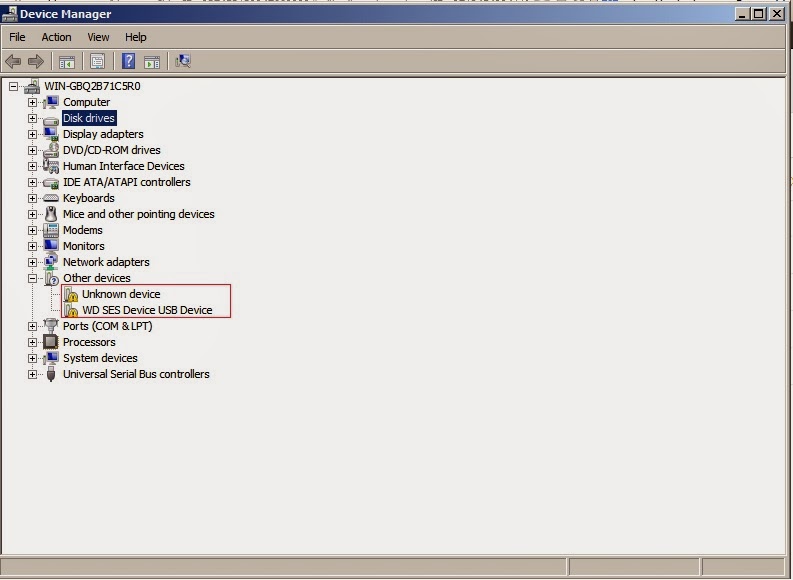
2. Click on Control Panel and Select Device Manager. This would display various hardware attached to the computer. If the drivers for a certain hardware is connected to the computer but the driver is missing, it will show a yellow caution sign as seen in the image below.

 
3. Making sure the hardware device is connected, from the Device Manager, locate the hardware name and you would see the caution sign. For example, In the image above, you would see something similar WD SES Device USB Device with the caution sign.

4. Right Click on it and select Update Driver Software


5. Select Browse my computer for driver software


6. Click on Browse and navigate to the folder you saved all your downloaded drives.


7. Click OK and then click Next and then let Windows install the drivers for you.


At the end of the installation, drivers will be correctly installed and device would be identified without the caution sign.

For more smartphone helps, tutorials and gists, like our Facebook page and follow on Twitter.


Baca Selengkapnya ....

Tecno, Be, Micromax And Others Join With BlackBerry

Posted by Unknown Selasa, 26 November 2013 0 komentar
OEMs across Africa have made a collaborative with BlackBerry to make sure that BBM is pre-installed on their devices. This would mean that once a new device from these OEMs are turned on, it will come already pre-installed with BBM.


Popular OEMs that have joined the deal are TECNO, Be, Micromax, Snexian, TiPhone, Brightstar, Celkon, EVERCOSS, IMO, Mito, Spice and Zen.

Its possible other OEMs like Infinix, iTel etc partake in this collaborative efforts in the near future.

Already, most of these devices come with Whatsapp pre-installed on their devices but with BBM increasingly becoming more popular and relevant in the Android community, its only logical that this happens so as to increase the selling point for their devices.

Like our Facebook page and follow us on Twitter for more smartphone news.


Baca Selengkapnya ....

Download iOS 7.1 Beta 1 Here

Posted by Unknown 0 komentar


Apple recently released iOS 7.1 beta 1 to developers. As you may know, beta versions of iOS are for developers only which means that its not available to everyone yet. Also, these beta versions may have glitches and issues.

That being said, if you are a developer or not a developer and wish to install this new iOS 7.1 to your iDevice, you carry the risk of not getting some apps to work. Furthermore, you would lose your jailbreak if  you are currently on a jailbroken iOS device.

iOS 7.1 seek to address many issues and bug fixes. Among them is Bluetooth issue where 32-bit apps running on a 64-bit device cannot attach to BTServer. 

The links below are the links to download iOS 7.1 beta 1 for various devices.
Like our Facebook page and follow us on Twitter for more smartphone news


Baca Selengkapnya ....

An iPhone Thief Did The Unbelievable

Posted by Unknown Senin, 25 November 2013 0 komentar
 
A thief is a thief but some thieves are of a different mindset. So is the story of a thief that did the unexpected in China earlier today.

The iPhone thief took out an iPhone from his victim's (Zou Bin) pocket while sitting together in a taxi. 

Zou Bin, who is the owner of the phone which contains about 1000 contacts was pissed and furious which gave birth to the conversation below.

"I know you are the man who sat beside me. I can assure you that I will find you,” Bin said in a text message to the thief.

“Look through the contact numbers in my mobile and you will know what trade I am in,” he continued. “Send me back the phone to the address below if you are sensible.”

According to reports, Bin works in an industry long reported to have links with gang activity.
Days after sending his message, Bin received a parcel containing his SIM card and pages of handwritten contact numbers — although no iPhone.

Chinese Internet users have given the thief a pass, however — labeling him “the conscience of the (theft) industry”.

“What a sympathetic and faithful thief, one who values professional ethics,” posted a user on Sina Weibo, the Chinese equivalent of Twitter.

It could be a bluff but am sure the thief didn't wanna take chances if his victim is really one that can track him down and deal a good amount of blows on his face or send some guys with a short axe like the one in the image.


Well, perhaps, such threat can work if you find yourself in the same position. Just remember to save random people's name with killing titles.

Like our Facebook page and follow us on Twitter for timely smartphone gists.


Baca Selengkapnya ....

Farming Simulating App For Android and iOS

Posted by Unknown Selasa, 19 November 2013 0 komentar
One thing that makes smartphones this powerful in our age and era is the availability of powerful apps that can increase productivity to a higher degree.

One of such apps is the Farming Simulator app designed for both Android and iOS devices. Its one of those apps that is not only a game but a very educative piece of app.


Farming Simulator created by GIANTS software is according to the creators is a “highly detailed 3D graphics and a slick user interface game that take your gameplay experience to the next level.”

In comparison with the previous installment in the franchise, Farming Simulator 14 offers double the number of farm machines that players can take control of, from well-known brands, including Case IH, Deutz-Fahr, Lamborghini, Kuhn, Amazone and Krone.

Aside from the single-player mode, Farming Simulator 14 allows players to have fun with a friend roaming the open world via Wi-Fi and Bluetooth.

You can now download Farming Simulator 14 for Android for £1.99 / €2.49 / $2.99 via Google Play Store. Keep in mind that the game should be fully compatible with all devices running Android 2.3.3 and up.

So, have you ever wondered about what its like to be a successful farmer? Try Farming Simulator and you would see for yourselves. 

Like our Facebook page and follow on Twitter to keep abreast of smartphone information and tutorials.


Baca Selengkapnya ....

BlackBerry Z50 smartphone

Posted by Unknown 0 komentar
Whenever there is a new boss in a company it is always accompanied with a lot of changes and exciting announcements.

John S Chen is the new Interim boss of BlackBerry and that comes with new announcements and changes. One of them is the rumor of the company releasing a new BlackBerry 10 device soon. See BlackBerry Z30 specs, now imagine Z50...


This new device according to rumor is BlackBerry Z50 and would be having a 5.2 inch display (slightly bigger than Z30).

Also, the rumor is that it would be a Quad-Core device with excellent RAM and processor speed.

Further details would e needed to truly confirm this rumor, however, it is always exciting to hear of rumors of new smartphone to be released and our eyes are peeled to see this new Z50 smartphone if the rumors are true.

Like our Facebook page and follow on Twitter to keep abreast of smartphone information and tutorials.


Baca Selengkapnya ....
Trik SEO Terbaru support Online Shop Baju Wanita - Original design by Bamz | Copyright of samsung galaxy blaze.